 By
By 
The world of AI agents is evolving rapidly, and the infrastructure needed to run them is changing just as fast. A new experimental project from Cloudflare called Moltworker is challenging the assumption that you need expensive local hardware to run AI agents 24/7. Here's what's happening and why it matters.
What is OpenClaw?
OpenClaw (formerly known as Moltbot and Clawdbot before that) is an open-source agentic AI system that can autonomously handle tasks for you around the clock. Think of it as a digital assistant that doesn't just answer questions, but actually takes action on your behalf.
Unlike traditional chatbots that simply respond to queries, OpenClaw is "agentic" – meaning it can:
Break down complex tasks into smaller steps
Make decisions about what to do next
Use tools like web browsers, terminals, and code execution environments
Remember context across multiple interactions
Work continuously on long-running tasks even when you're not watching
For example, you could ask OpenClaw to monitor a website for price changes, compile research reports, manage data processing workflows, or automate repetitive coding tasks. The agent would work on these tasks persistently, making intelligent decisions along the way.
The Traditional Setup: Running OpenClaw on Your Hardware
Originally, running an AI agent like OpenClaw meant setting up significant infrastructure on your local machine. Here's what that looked like:
Hardware Requirements
Many early adopters found themselves purchasing Mac Minis or equivalent hardware specifically to run these agents. Why? Because you needed:
Sufficient RAM and CPU: AI agents make frequent API calls, run code, process data, and maintain state – all of which require computing resources
Always-on availability: Your machine needs to run 24/7 if you want your agent working around the clock
Reliable internet: Constant connectivity is essential for API calls to AI providers like Anthropic or OpenAI
Storage: Database systems to maintain the agent's memory and task history
Software Stack
Beyond hardware, you'd need to manage:
Operating System: Keep it updated and secure
Database: Usually PostgreSQL or SQLite for storing the agent's memory and state
Runtime Environment: Node.js or Python environments with all dependencies
Security: Firewall configuration, SSL certificates if exposing services
Process Management: Systems to ensure the agent restarts if it crashes
The Security Problem
Here's where things got genuinely scary: giving an AI agent access to a terminal on your local machine is inherently risky. If the agent is compromised through prompt injection (where malicious instructions are hidden in data the agent processes), an attacker could potentially:
Access your file system
Steal credentials
Install malware
Use your machine as part of a botnet
This security concern alone made many people hesitant to run agentic AI locally, despite the compelling use cases.
Enter Cloudflare Moltworker: A Different Approach
Cloudflare Moltworker reimagines this entire setup. Instead of running everything on your local hardware, it demonstrates how to deploy an AI agent entirely on Cloudflare's edge infrastructure. Here's how it works:
The Architecture Shift
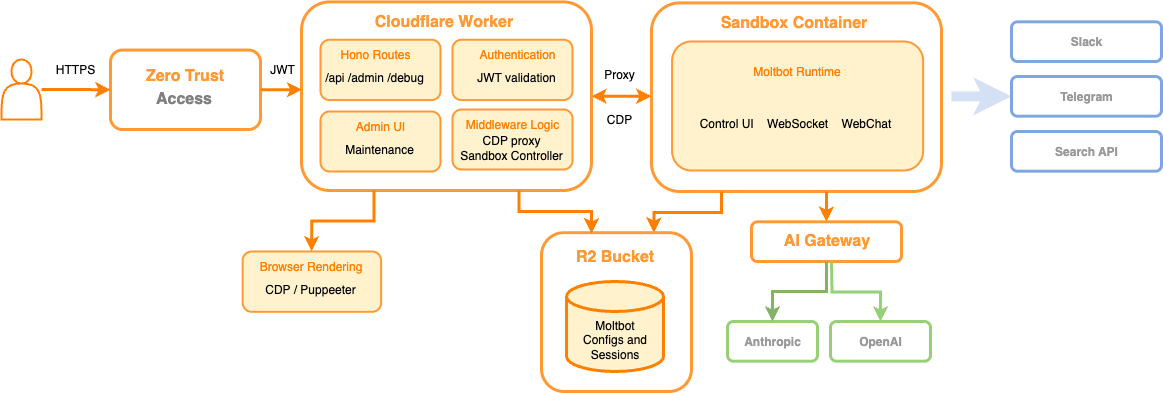
Moltworker leverages several Cloudflare services working together:
Cloudflare Workers: The agent's code runs on Cloudflare's serverless platform, distributed across 300+ data centers globally. You're not maintaining servers – you're running code on-demand.
R2 Storage: Instead of a local PostgreSQL database, the agent's long-term memory and logs are stored in Cloudflare's object storage (similar to Amazon S3 but cheaper for egress).
Sandbox SDK: This is the game-changer for security. Each time the agent needs to run code or execute commands, Cloudflare spins up an isolated micro-VM that exists only for that specific task, then destroys it immediately after. It's like giving the agent a clean room that disappears when the work is done.
Browser Rendering API: When the agent needs to interact with websites, Cloudflare provides headless Chromium instances – no need to run browsers on your machine.
AI Gateway: Routes API calls to AI providers (Anthropic, OpenAI, etc.) with centralized billing, caching, and observability.
Zero Trust Access: Built-in authentication and access control without manually configuring firewalls or certificates.
From wrangler deploy to Running Agent
With Moltworker, deployment looks like this:
That's it. No operating system to patch, no database to configure, no SSL certificates to renew. Cloudflare handles the infrastructure while you focus on what your agent should do.
Benefits of the Moltworker Approach
1. Dramatically Lower Barrier to Entry
You no longer need to buy a Mac Mini or dedicate hardware. Starting costs can be as low as $5/month for the Workers Paid plan (though actual costs vary with usage). You can run an AI agent from a laptop, phone, or any device with internet access.
2. Security Through Isolation
The Sandbox SDK creates ephemeral micro-VMs for code execution. Even if an attacker successfully injects malicious commands through prompt injection, they gain access to a virtual environment that will be destroyed in seconds. Your actual system remains untouched.
3. Zero Infrastructure Management
No more:
OS updates at 2 AM
Database backup strategies
Monitoring disk space
Configuring firewalls
Renewing SSL certificates
Debugging why the agent stopped running
Cloudflare manages all of this at the platform level.
4. Global Distribution
Your agent runs on edge infrastructure close to users and data sources, potentially reducing latency for API calls and web interactions.
5. Built-in Observability
Through AI Gateway and Workers Analytics, you get visibility into:
How many AI API calls you're making
Cost tracking across providers
Performance metrics
Error rates
6. Infinite Scale (Theoretically)
Serverless infrastructure scales automatically. If your agent needs to spawn multiple parallel tasks, the platform handles it without you provisioning additional capacity.
Challenges and Limitations of Moltworker
Before you rush to migrate everything, here are important caveats:
1. Not an Official Product
Cloudflare explicitly states this is an experimental proof-of-concept, not a supported product. This means:
No SLA guarantees
Could break with platform updates
Limited official documentation
You might need to maintain your own fork for production use
2. Cost Uncertainty at Scale
While the starting cost is low, actual expenses depend heavily on:
CPU time consumed (billed per millisecond of active execution)
Number of AI API calls
R2 storage and operations
Browser Rendering API usage
For high-intensity agents running constantly, costs could climb significantly. You won't know until you monitor actual usage.
3. Platform Lock-in
Building on Cloudflare's specific APIs (Durable Objects, R2, Sandbox SDK) means your agent becomes tightly coupled to their platform. Migrating to AWS, Azure, or back to local infrastructure would require substantial rewriting.
4. Execution Time Limits
Cloudflare Workers have execution time constraints. For extremely long-running tasks, you need to architect around these limits using patterns like breaking work into chunks or using Durable Objects for state management.
5. Node.js Compatibility Isn't 100%
While Cloudflare claims 98.5% Node.js package compatibility, that missing 1.5% might include packages critical to your specific use case. Native modules and certain file system operations may not work.
6. Debugging Complexity
Troubleshooting distributed, serverless systems is inherently harder than debugging a local application where you can attach a debugger and inspect state directly.
7. Data Residency and Privacy
If you're working with sensitive data, running agents on Cloudflare's infrastructure means trusting their security model and potentially navigating data residency regulations (though Cloudflare does offer regional services).
What This Means for the Future
Moltworker, whether it succeeds as a project or not, represents an important signal: agent hosting is becoming commoditized infrastructure.
Just as we moved from physical servers to virtual machines to containers to serverless functions, AI agents are following a similar trajectory. The question is shifting from "Can I afford the hardware to run an agent?" to "Which platform best supports my agent's needs?"
For developers in Kenya and across Africa, this democratization is particularly significant. You no longer need expensive hardware or complex DevOps expertise to experiment with agentic AI. A student with a $5/month budget can deploy the same infrastructure that would have required thousands of dollars in hardware just a year ago.
Should You Use Moltworker?
Consider it if:
You're experimenting with AI agents and want minimal setup
You value security isolation for code execution
You prefer infrastructure-as-code deployments
You're comfortable with bleeding-edge, experimental technology
Stick with local or traditional cloud if:
You need guaranteed uptime and support (this is experimental)
You're running production workloads that can't tolerate breaking changes
You need full control over execution environment and data
You require specific packages incompatible with Workers runtime
Conclusion
Cloudflare's Moltworker isn't just about running OpenClaw in the cloud – it's a glimpse into how AI infrastructure is evolving. The combination of serverless computing, edge distribution, and micro-VM isolation creates a new paradigm for deploying autonomous agents safely and affordably.
Whether Moltworker itself becomes the standard or simply inspires better solutions, one thing is clear: the barrier to running sophisticated AI agents is collapsing. That's good news for developers everywhere, especially in markets where expensive hardware has been a limiting factor.
The age of accessible, always-on AI agents is here. The only question is what we'll build with them.
Have you experimented with AI agents or Cloudflare Workers? Share your experience in the comments below.
Comments